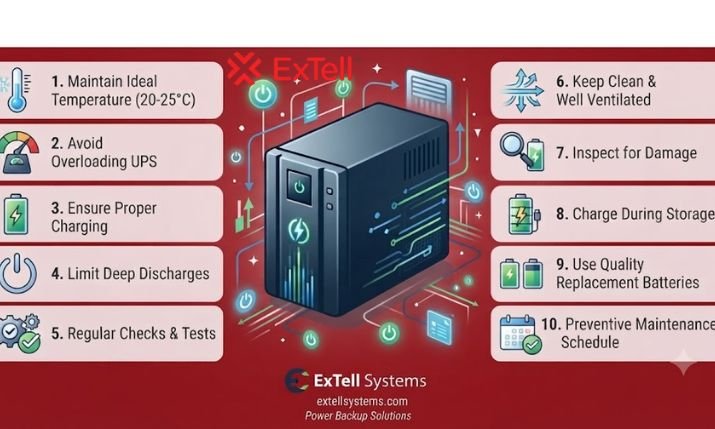

Your UPS Is Only as Good as the Battery Behind It
A UPS (Uninterruptible Power Supply) helps protect critical equipment from unexpected power interruptions. But even a high-quality UPS cannot deliver the backup time you expect if its batteries are incorrectly selected, poorly maintained, or nearing the end of their service life.
When the main power supply fails, the battery becomes the energy source that keeps connected equipment running. Its capacity, condition, configuration, and operating environment all influence how reliably the UPS performs.
For businesses that depend on servers, networking equipment, data centers, security systems, and other critical infrastructure, choosing the right UPS battery is just as important as choosing the UPS itself.
In this guide, we explain how UPS batteries work, what affects backup time, how to select a compatible battery, and which maintenance practices can help support dependable power protection.
Why Is the Battery So Important in a UPS?
A UPS provides backup power when the normal electricity supply becomes unavailable or unstable. During a power failure, its battery supplies DC power to the UPS inverter, which converts that energy into AC power for connected equipment.
The battery therefore plays a direct role in determining how long the system can support its load.
Even when a UPS is working correctly, a weak or incompatible battery may result in shorter runtime, unexpected shutdowns, or insufficient backup during an outage. Battery health is a key part of UPS reliability, which is why regular inspection and preventive maintenance matter.
A dependable backup power system should be planned as a complete solution:
- UPS capacity: The power the system can safely support.
- Battery capacity: The stored energy available during an outage.
- Connected load: The equipment drawing power from the UPS.
- Battery configuration: The required voltage, quantity, and arrangement.
- Operating environment: Temperature, ventilation, and installation conditions.
- Maintenance: Regular checks, testing, and timely replacement.
If one of these elements is overlooked, the system may not deliver the expected backup performance.
What Determines UPS Battery Backup Time?
UPS runtime is not determined by battery capacity alone. Several factors work together to influence how long a battery can support connected equipment.
1. Connected Load
The connected load is the total power consumed by the equipment protected by the UPS. A higher load generally uses stored battery energy more quickly, reducing backup time.
For example, a UPS supporting a few network switches may provide a different runtime from the same system powering multiple servers and storage devices.
Before choosing a battery, identify which equipment needs backup and calculate its actual power requirement.
2. Battery Capacity and Voltage
Battery capacity is commonly expressed in ampere-hours (Ah), while voltage is measured in volts (V). Both values matter when evaluating the energy available from a battery bank.
However, comparing Ah ratings alone can be misleading. The battery voltage, number of batteries, configuration, discharge conditions, and connected load must also be considered.
The right battery setup should match the UPS manufacturer’s specifications and the required runtime.
3. Battery Age and Condition
UPS batteries gradually lose performance as they age and experience charging and discharging cycles. A battery that once provided sufficient backup may no longer support the same runtime after deterioration.
Regular battery testing can help identify declining performance before an outage exposes the problem.
4. Temperature and Installation Conditions
Temperature can influence battery performance, charging, and service life. A poorly ventilated installation or an environment outside the manufacturer’s recommended range may affect reliability.
Keep the battery system in suitable operating conditions, maintain appropriate ventilation, and follow the manufacturer’s environmental guidelines.
5. UPS Efficiency and Configuration
The UPS’s efficiency, operating mode, battery condition, and system configuration also affect runtime. As a result, a simple calculation should be treated as an estimate rather than a guarantee.
For critical installations, use model-specific runtime curves or the manufacturer’s runtime calculator where available.
How Do You Choose the Right UPS Battery?
Selecting a UPS battery requires more than choosing the highest available Ah rating. The battery must be compatible with the UPS and suitable for the intended application.
Follow these steps before purchasing a battery system.
Step 1: Confirm UPS Compatibility
Check the UPS model’s required DC voltage, battery type, battery quantity, charging requirements, and supported external battery options. An incorrect configuration may damage equipment or prevent the system from operating as intended.
Never add batteries simply to increase backup time without confirming compatibility with the UPS manufacturer.
Step 2: Calculate Your Backup Requirements
Decide how long your equipment must remain operational during a power interruption. A small office may need enough time to save work and shut down safely, while a data center may require backup that bridges the gap until a generator takes over.
The required runtime affects battery capacity, configuration, installation space, and overall cost.
Step 3: Select the Appropriate Battery Technology
Different battery technologies offer different characteristics in terms of cost, maintenance, installation, service life, and energy density.
Valve-Regulated Lead-Acid (VRLA) batteries, including gel batteries, are used in many standby power applications. Other technologies may be appropriate depending on the UPS design and project requirements.
Evaluate the application first, then choose a battery technology supported by the selected UPS.
Step 4: Consider Future Expansion
Business power requirements can grow as more servers, network devices, or other equipment are added. If longer backup time may be needed in the future, check whether the UPS supports compatible external battery packs or approved battery expansion.
Planning ahead can help avoid unnecessary replacement or redesign later.
Step 5: Review Warranty and Technical Support
Battery selection is also a lifecycle decision. Check warranty terms, installation requirements, maintenance support, replacement availability, and the expected service conditions.
For business-critical applications, access to qualified technical support can help simplify system planning and maintenance.
How Can You Maintain UPS Batteries for Better Reliability?
Battery maintenance helps identify potential issues before they cause unexpected downtime. A practical maintenance plan should include the following activities.
- Inspect batteries regularly: Look for swelling, leakage, corrosion, damaged connections, or other visible signs of deterioration. Follow appropriate safety procedures.
- Monitor battery alarms: Investigate battery-related warnings and UPS fault indicators instead of ignoring them.
- Test battery performance: Use manufacturer-approved self-tests and professional testing where appropriate.
- Maintain suitable temperatures: Keep the battery installation within the recommended operating range.
- Review runtime expectations: Compare observed performance with the backup time required for your application.
- Plan replacements: Use manufacturer guidance, test results, battery age, and operating conditions to determine when replacement is needed.
- Document maintenance: Keep records of inspections, test results, replacements, and any battery-related issues.
Maintenance frequency should reflect the UPS manufacturer’s recommendations, the battery technology, and the criticality of the installation. A scheduled preventive maintenance plan can help reduce the risk of discovering battery problems during an outage.
What Happens When You Choose the Wrong UPS Battery?
An unsuitable or poorly maintained battery system can create several operational risks:
- Backup time may be shorter than expected.
- Critical equipment may shut down during an outage.
- Batteries may deteriorate sooner than planned.
- Replacement and maintenance costs may increase.
- Businesses may face avoidable interruptions to services.
- IT teams may have less time to perform a controlled shutdown or transition to generator power.
These problems can often be reduced through proper load assessment, compatible battery selection, routine testing, and planned maintenance.
ExTell Systems: Planning UPS and Battery Solutions Together
At ExTell Systems, power backup is part of a broader infrastructure approach that includes UPS systems and compatible battery solutions for different deployment requirements.
For example, ExTell offers external battery packs designed for selected UPS ranges. The ESPRBP-48VDC and ESPRBP-72VDC battery packs are listed for compatibility with Spectra, Spectra Pro, and Magna Series UPS systems. Always verify the specific UPS model and battery configuration before selecting a pack.
When planning a solution, consider the complete requirement: connected load, target runtime, UPS capacity, battery compatibility, available space, and future expansion.
A properly matched UPS and battery system helps businesses prepare for power interruptions with greater confidence.
Frequently Asked Questions
1. Why is the battery important in a UPS?
The battery supplies energy to the UPS when the main electricity supply fails. Its condition and capacity directly affect backup time and the ability to keep connected equipment running.
2. How long does a UPS battery last?
Battery service life depends on battery technology, temperature, charging and discharging patterns, maintenance, and operating conditions. Follow manufacturer guidance and use battery test results to plan replacement rather than relying on age alone.
3. Does a higher Ah battery always provide more backup time?
Not necessarily. Voltage, battery quantity, configuration, load, and UPS compatibility also matter. Compare the complete battery system and use manufacturer-supported runtime information.
4. Can I add extra batteries to increase UPS runtime?
Only if the UPS supports the additional battery configuration. Confirm the required voltage, battery type, quantity, charging capability, and approved expansion options before making changes.
5. How can I tell if my UPS battery needs replacement?
Warning signs may include reduced backup time, battery alarms, failed self-tests, physical swelling, leakage, or other visible damage. Follow the manufacturer’s safety guidance and arrange professional inspection when necessary.
Explore More from ExTell Systems
https://extellsystems.com/contact
https://extellsystems.com/about
Sales mail :- sales@jaygenesisvirtue.com
Choose the Right Battery for Reliable Backup Power
A UPS can only provide the expected backup when its battery system is properly selected, configured, and maintained. Matching the battery to the connected load, required runtime, and UPS specifications can help improve preparedness and reduce the risk of unexpected shutdowns.
Planning a new UPS installation or reviewing an existing battery system? Visit ExTell Systems to explore power backup solutions and contact the team to discuss your application, runtime requirements, and compatible battery options.