
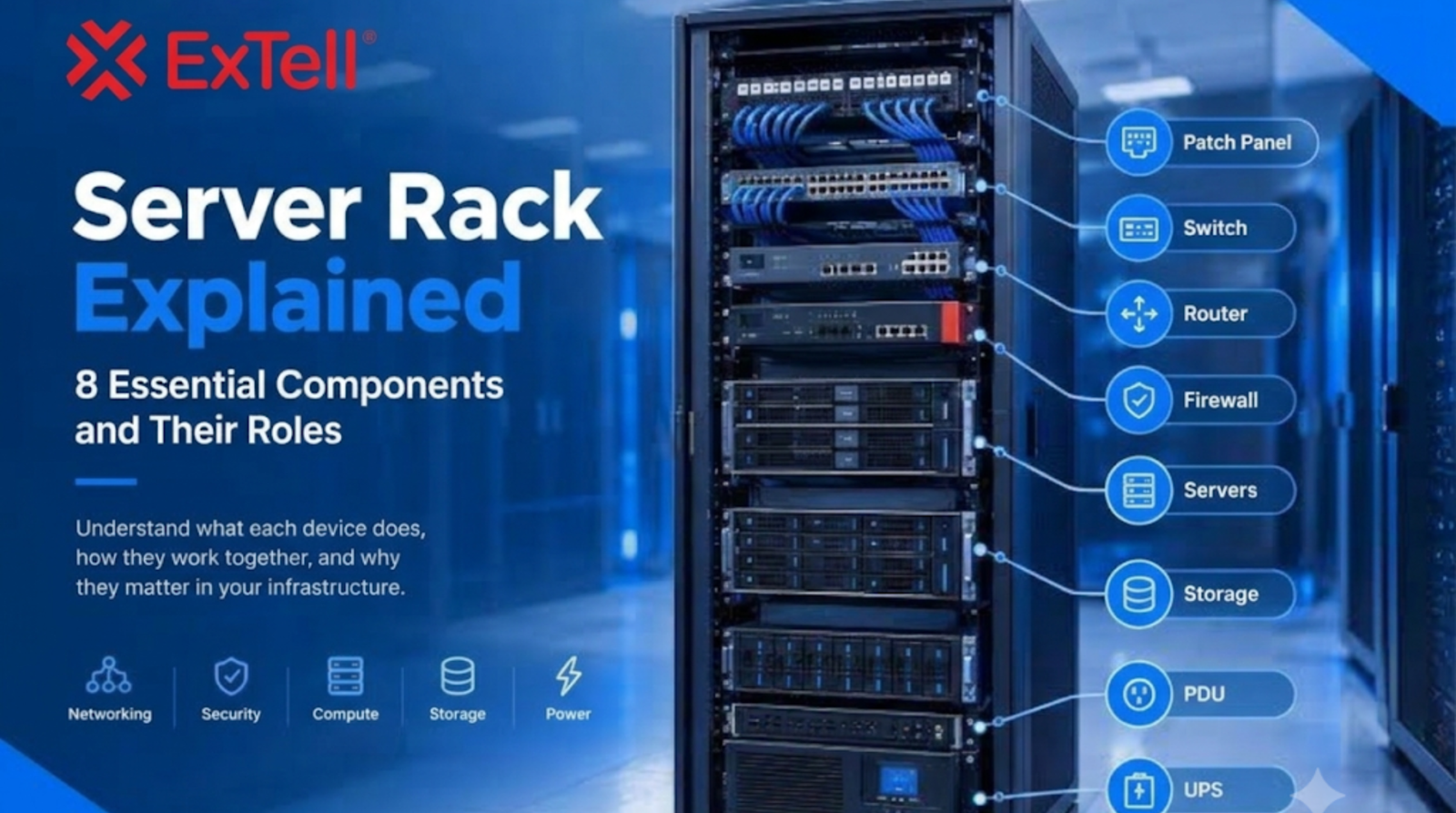
Network Rack vs Server Rack: Differences, Features and Applications
Modern businesses depend on reliable IT infrastructure to manage data, support communication, and maintain daily operations. Data centers, offices, telecom facilities, and enterprise networks use different types of equipment to keep their systems connected and organized.
Two important components of this infrastructure are network racks and server racks. Although they may look similar, they serve different purposes and are designed around different equipment requirements.
Choosing the right rack is important for equipment protection, cable management, airflow, space utilization, and future expansion.
But what is the difference between a network rack and a server rack? Can they be used interchangeably? And which option is suitable for your business?
This guide explains their differences, features, and applications to help businesses make an informed decision.
What Is a Network Rack?
A network rack is a metal enclosure or frame designed to organize and support networking equipment. It provides a dedicated space for devices that manage communication and data transmission across an organization’s network.
Network racks are commonly used in offices, telecom rooms, commercial buildings, and data centers.
They typically accommodate:
- Network switches.
- Routers and gateways.
- Patch panels.
- Fiber optic distribution units.
- Cable management panels.
- Network accessories.
The main purpose of a network rack is to keep connectivity equipment organized and accessible. It also helps reduce cable clutter and makes network maintenance easier.
A properly planned network rack allows IT teams to identify connections, manage cables, and make changes without disturbing other equipment.
What Is a Server Rack?
A server rack is a specially designed enclosure used to house servers and other IT equipment. It provides a structured environment for installing equipment that processes, stores, and manages business data.
Server racks are commonly found in enterprise server rooms, cloud infrastructure facilities, and large data centers.
They may accommodate:
- Rack-mounted servers.
- Storage systems.
- Network switches.
- Power Distribution Units (PDUs).
- UPS equipment designed for rack installation.
- KVM switches and server accessories.
Server racks are generally designed to support heavier equipment and manage the heat generated by servers.
They often include features such as front and rear doors, side panels, ventilation arrangements, adjustable mounting rails, and secure locking systems.
The main purpose of a server rack is to provide organized, secure, and accessible equipment housing while supporting suitable airflow and thermal management.
Network Rack vs Server Rack: Key Differences
Network racks and server racks share some design features, but their intended applications are different.
Here is a comparison of their major differences.
| Feature | Network Rack | Server Rack |
|---|---|---|
| Primary purpose | Organizing networking equipment | Housing servers and IT equipment |
| Typical equipment | Switches, routers, patch panels | Servers, storage, PDUs |
| Equipment weight | Usually lighter | Often heavier |
| Depth requirements | May be shallow or medium | Usually deeper |
| Cable management | Major design priority | Important alongside equipment management |
| Airflow | Depends on networking equipment | Important due to server heat generation |
| Security | Depends on installation | Often includes lockable doors and panels |
| Applications | Offices, telecom rooms, network closets | Server rooms and data centers |
The exact specifications vary between manufacturers and rack models. Businesses should select equipment according to actual dimensions, weight, power, and cooling requirements rather than relying only on the rack category.
1. Differences in Rack Size and Depth
One of the most important differences between network racks and server racks is their depth.
Network equipment such as switches, patch panels, and routers often requires less installation depth. Therefore, network racks are available in compact designs that fit easily into offices and telecom rooms.
Server equipment usually requires more depth because rack-mounted servers and storage systems can be larger and heavier.
Before selecting a rack, businesses should consider:
- Height and available rack units (U).
- Internal mounting depth.
- Equipment width and depth.
- Weight-bearing capacity.
- Space required for cables and connectors.
- Front and rear maintenance access.
Most enterprise racks follow the standard 19-inch equipment mounting format, but equipment dimensions and rail compatibility should always be checked.
2. Cable Management and Organization
Cable management is important for both rack types, but network racks often require particular attention to connectivity organization.
A network rack may contain multiple switches, patch panels, fiber distribution units, and hundreds of cable connections.
Without proper cable management, identifying connections and troubleshooting network issues can become difficult.
Useful cable management components include:
- Horizontal cable managers.
- Vertical cable managers.
- Cable trays and guides.
- Patch panels.
- Fiber optic management accessories.
Server racks also require organized power and data cabling. Proper routing helps prevent cable obstruction and supports maintenance activities.
A well-organized rack makes equipment easier to access and helps IT teams manage infrastructure more efficiently.
3. Airflow and Cooling Requirements
Cooling is another important consideration when comparing network racks and server racks.
Servers generate heat during processing and continuous operation. If hot air cannot escape properly, equipment temperatures may increase and affect performance.
Server racks may include:
- Perforated front and rear doors.
- Ventilation openings.
- Fan units where required.
- Cable openings for organized routing.
- Airflow management accessories.
Network racks also need suitable ventilation, especially when multiple switches and networking devices operate continuously.
For data center installations, rack selection should support the facility’s overall cooling design. This includes airflow direction, hot aisle and cold aisle arrangements, equipment placement, and blanking panels where appropriate.
4. Security and Physical Protection
Network and server racks may contain valuable business equipment and sensitive infrastructure.
Physical protection is therefore an important selection factor.
A suitable rack may offer:
- Lockable front and rear doors.
- Removable or lockable side panels.
- Strong metal construction.
- Secure equipment mounting.
- Controlled access arrangements.
Server racks often require additional physical security because they house servers, storage devices, and critical business applications.
Network racks also need protection to prevent unauthorized access to switches, routers, and communication connections.
5. Network Rack vs Server Rack: Which One Should You Choose?
The right choice depends on the type of equipment you want to install and the environment in which it will operate.
Choose a network rack when:
- Your primary equipment includes switches, routers, and patch panels.
- You need organized network connectivity.
- You are installing equipment in an office or telecom room.
- You need a compact rack for network distribution.
- Cable management is a major requirement.
Choose a server rack when:
- You need to install rack-mounted servers.
- Your infrastructure includes storage systems.
- Equipment requires greater mounting depth.
- You need higher weight capacity.
- Airflow and thermal management are major concerns.
For facilities that contain both servers and networking equipment, businesses may use a combination of network and server racks.
This approach allows equipment to be organized according to its function and installation requirements.
6. Important Factors to Consider Before Buying a Rack
Before purchasing a network rack or server rack, evaluate the following points:
- Equipment compatibility: Check the dimensions and mounting requirements of all devices.
- Rack capacity: Ensure the rack supports the total equipment weight.
- Available space: Measure the installation area and required access clearance.
- Cooling: Select a design that supports the required airflow.
- Cable management: Consider accessories for organized power and network connections.
- Security: Check door locks, side panels, and physical protection.
- Future expansion: Allow space for additional equipment as business requirements grow.
A properly selected rack can simplify installation, improve equipment organization, and support future infrastructure upgrades.
7. Why Network and Server Racks Matter in Modern Data Centers
Modern data centers depend on organized equipment installations to support continuous digital operations.
Servers process business applications, storage systems manage information, and networking devices connect different parts of the infrastructure.
Network and server racks provide the physical structure required to install and manage this equipment.
Their importance includes:
- Better equipment organization.
- Efficient use of available floor space.
- Improved cable management.
- Easier equipment maintenance.
- Support for structured infrastructure expansion.
- Better integration with power and cooling arrangements.
As businesses adopt cloud computing, artificial intelligence, and data-intensive applications, well-planned rack infrastructure becomes increasingly important.
Frequently Asked Questions (FAQs)
1. What is the main difference between a network rack and a server rack?
A network rack is primarily designed for switches, routers, patch panels, and connectivity equipment. A server rack is designed to house servers, storage systems, and other IT equipment that generally requires greater depth and weight support.
2. Can a network rack be used as a server rack?
Yes, if the rack has sufficient depth, weight capacity, mounting compatibility, and ventilation for the server equipment. Always check manufacturer specifications before installation.
3. What is the standard size of a network or server rack?
Many network and server racks use a standard 19-inch equipment mounting format. Their height is measured in rack units (U), where one rack unit equals 1.75 inches (44.45 mm).
4. Why is airflow important in server racks?
Servers generate heat during operation. Proper airflow helps remove hot air, maintain suitable operating temperatures, and reduce the risk of overheating.
5. Which rack is better for a data center?
Both are important in data centers. Server racks are suitable for servers and storage equipment, while network racks organize switches, routers, and connectivity systems. The selection depends on equipment requirements and the data center layout.
Conclusion: Choose the Right Rack for Efficient IT Infrastructure
Network racks and server racks play important roles in modern IT infrastructure. Although they may look similar, their design, depth, load capacity, airflow requirements, and applications can differ.
Network racks help organize connectivity equipment, while server racks provide structured housing for servers and storage systems.
Before selecting a rack, businesses should evaluate equipment compatibility, available space, weight capacity, cooling requirements, cable management, and future expansion needs.
A well-planned rack installation helps improve equipment organization, simplify maintenance, and support reliable network and data center operations.
Looking for reliable network racks and ICT infrastructure solutions? Explore ExTell Systems’ product portfolio and connect with the team to discuss your business requirements.
Website: https://extellsystems.com/
Contact: https://extellsystems.com/contact
Sales email: sales@jaygenesisvirtue.com