Rack-Mount or Tower UPS: Which Is Better for Your Server Room?
Introduction
A reliable Uninterruptible Power Supply (UPS) is essential for protecting servers, networking equipment, storage systems, and other critical IT infrastructure from power interruptions. However, choosing the right UPS involves more than checking its capacity and battery backup time. You must also consider how the UPS will fit into your server room.
Two common options are rack-mount UPS and tower UPS systems. Both can provide backup power and help protect connected equipment, but they differ in installation, space requirements, accessibility, and suitability for different IT environments.
A rack-mount UPS is generally a practical choice for equipment installed inside server racks, while a tower UPS is suitable for standalone equipment and server rooms with available floor space. The better option depends on your existing infrastructure, power requirements, available space, and plans for future expansion.
This guide explains the differences between rack-mount and tower UPS systems and how to choose the right solution for your business.
What Is a Rack-Mount UPS?
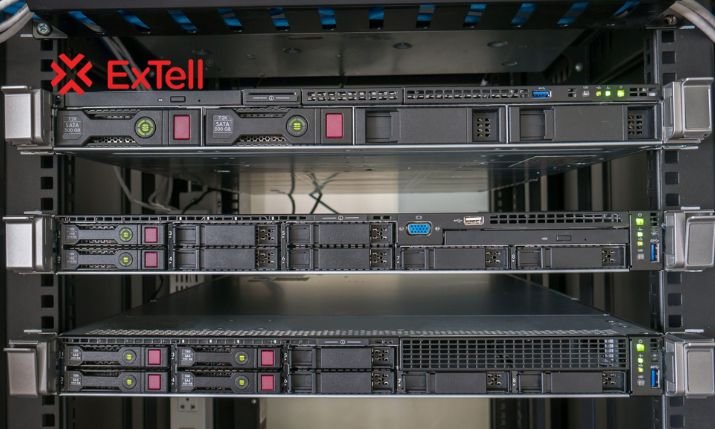
A rack-mount UPS is designed to fit inside a compatible server rack or network cabinet, typically using a standard 19-inch rack format. It is installed alongside equipment such as servers, switches, routers, firewalls, and storage devices.
Rack-mount UPS systems are commonly used in organized IT environments where multiple devices share a central rack.
Key Benefits of a Rack-Mount UPS
1. Efficient use of space
A rack-mount UPS uses vertical rack space rather than requiring a separate floor position. This can help keep server rooms organized, particularly where floor space is limited.
2. Better equipment organization
Installing the UPS close to the protected equipment can simplify power cable routing and help create a cleaner rack layout.
3. Centralized power protection
A rack-mount UPS can provide backup power to multiple compatible devices within the rack, provided the total load remains within its rated capacity.
4. Suitable for structured IT environments
Rack-mount systems work well in network cabinets, server rooms, telecommunications installations, and other environments with rack-based equipment.
When Should You Choose a Rack-Mount UPS?
Consider a rack-mount UPS if your business operates:
- Server racks with multiple servers
- Network cabinets containing switches and routers
- Small or medium-sized data rooms
- Telecommunications equipment racks
- Structured IT infrastructure that requires organized power distribution
Before installation, check the rack’s depth, available rack units, weight capacity, rail compatibility, ventilation, and maintenance access.
What Is a Tower UPS?
A tower UPS is a standalone, vertically oriented unit designed to sit on a suitable floor or other manufacturer-approved surface. Unlike a rack-mount UPS, it does not normally require installation inside a server cabinet.
Tower UPS systems are often used in offices, standalone server rooms, laboratories, and facilities where equipment is not installed in a dedicated rack.
Key Benefits of a Tower UPS
1. Flexible installation
A tower UPS can be installed near the equipment it protects, provided the location meets electrical, ventilation, and safety requirements.
2. No rack space required
Because the unit stands independently, it leaves valuable rack units available for servers, switches, storage devices, and other IT equipment.
3. Convenient physical access
Depending on the model, a tower UPS may offer straightforward access to its controls, connections, and battery compartment. This can make routine inspection and maintenance more convenient.
4. Suitable for standalone installations
Tower UPS systems can be a practical option for businesses that need backup power but do not have a dedicated server rack.
When Should You Choose a Tower UPS?
A tower UPS may be suitable for:
- Offices with standalone servers
- Small businesses without server racks
- Independent networking equipment
- Small IT rooms with sufficient floor space
- Installations where rack space is limited but floor space is available
Always keep the unit in its approved operating orientation and allow adequate clearance for cooling and servicing.
Rack-Mount vs Tower UPS: Key Differences
The following comparison highlights the main differences between these two UPS designs.
| Feature | Rack-Mount UPS | Tower UPS |
|---|---|---|
| Installation | Inside a compatible server rack | On a suitable standalone surface |
| Space usage | Uses rack units | Uses floor or designated equipment space |
| Best suited for | Rack-based IT infrastructure | Standalone equipment and IT rooms |
| Cable management | Convenient for organized rack installations | Depends on equipment placement |
| Physical access | Depends on rack layout and installation | Often easier when installed with clear access |
| Rack requirements | Requires compatible rack space and mounting support | Does not normally require a server rack |
| Maintenance | Requires suitable access to rails, connections, and batteries | Requires adequate clearance around the unit |
| Expansion | Depends on rack capacity and compatible battery options | Depends on available floor space and supported expansion options |
Neither design is automatically more reliable. Actual performance depends on the UPS technology, capacity, battery configuration, installation quality, and maintenance.
Which UPS Is Better for a Server Room?
The best UPS depends on how your server room is organized.
Choose a Rack-Mount UPS for Rack-Based Servers
If your servers, switches, routers, and storage systems are already installed in a standard rack, a rack-mount UPS can provide a neat and space-efficient arrangement.
It can also simplify power cable management and help keep the backup system close to the protected equipment.
However, consider the available rack units carefully. The UPS and any additional battery modules must fit without exceeding the rack’s weight limits or restricting airflow.
Choose a Tower UPS for Standalone Equipment
If your server room contains standalone servers or equipment arranged outside a dedicated rack, a tower UPS may be easier to install.
It also makes sense when preserving rack space is a priority and there is a suitable location for the UPS.
Ensure that the unit is protected from accidental impact, moisture, excessive heat, and unauthorized access.
What If Your Server Room Has Limited Space?
Assess both rack and floor space before deciding. A rack-mount UPS can reduce the need for separate floor space, but it consumes rack capacity. A tower UPS preserves rack units but requires a suitable floor position.
Include external battery cabinets, cable clearance, ventilation, and maintenance access in your calculations.
How to Choose the Right UPS for Your Business
Beyond the physical design, evaluate these five factors before purchasing a UPS.
1. Calculate Your Power Requirements
List all equipment that needs backup power and estimate its actual consumption. Check both the UPS’s kW and kVA ratings to ensure it can support the total load.
Allow suitable capacity for future equipment and consider startup requirements where applicable.
2. Determine the Required Backup Time
Decide how long your servers and network devices must continue operating during a power failure.
A short runtime may be sufficient for a controlled shutdown, while critical applications may require longer backup or coordination with a generator.
Check the manufacturer’s runtime information for the proposed load and battery configuration.
3. Select the Appropriate UPS Technology
Rack-mount and tower describe the physical design, not the electrical technology.
Depending on availability and requirements, either format may use standby, line-interactive, or online double-conversion technology. For sensitive IT equipment, evaluate how well the selected UPS handles voltage fluctuations, power disturbances, and transfer interruptions.
4. Consider Monitoring and Maintenance
Look for features such as battery status monitoring, alarms, communication interfaces, and remote management where needed.
Regular maintenance and timely battery replacement help support reliable operation.
5. Plan for Future Growth
If you expect to add servers, storage devices, or networking equipment, select a UPS that can accommodate the anticipated load.
Also consider battery expansion, redundancy requirements, service support, and the available electrical infrastructure.
Frequently Asked Questions
1. What is the difference between a rack-mount UPS and a tower UPS?
A rack-mount UPS fits inside a compatible server rack, while a tower UPS stands independently on a suitable surface. Both can provide backup power, but their installation and space requirements differ.
2. Is a rack-mount UPS better for servers?
A rack-mount UPS is often convenient when servers and networking equipment are already installed in a rack. However, a tower UPS may be more practical for standalone servers or server rooms without suitable rack space.
3. Can a tower UPS be installed inside a server rack?
Only if the manufacturer specifically supports rack installation for that model and provides the appropriate mounting hardware and instructions. Do not place a tower UPS sideways or use improvised mounting arrangements.
4. Which UPS requires less space?
A rack-mount UPS generally uses rack space instead of a separate floor position. A tower UPS requires floor or designated equipment space but preserves rack units for other equipment.
5. How do I choose the right UPS capacity for my server room?
Calculate the total connected load, check both kW and kVA ratings, determine the required backup time, and allow suitable capacity for future expansion. Also evaluate battery options, redundancy, and the UPS’s electrical specifications.
Explore More from ExTell Systems
https://extellsystems.com/contact
https://extellsystems.com/about
https://extellsystems.com/support
Sales mail :- sales@jaygenesisvirtue.com
Conclusion: Choose the Right UPS for Your Server Room
Both rack-mount and tower UPS systems can help protect critical IT equipment from power interruptions. A rack-mount UPS is generally well suited to organized server racks and network cabinets, while a tower UPS offers flexibility for standalone installations and environments where rack space is limited.
Before making a decision, assess your available space, total power load, required backup time, cooling, maintenance access, and future expansion plans. The right choice is the one that meets your operational needs while supporting safe and reliable power protection.
Looking for the right UPS for your server room? Visit ExTell Systems to explore power backup solutions and contact the team to discuss your equipment, capacity, and backup requirements.